Todd Bradley's Galaxy » Ahi Digital Audio Experiments
Ahi Digital Audio Experiments
What you are about to read is a log of my research into the digital audio capabilities of the vpr Matrix 200A5 notebook computer, with the vpr Matrix Digital Parallel Cable.
Journal Entries: March 22 - March 27 - March 29 - April 1 - April 14 - April 15
March 22, 2003
Hello and welcome! If you don’t already know, I’m Todd Bradley and I got a vpr Matrix 200A5 notebook computer in February of 2003. I bought the notebook to serve as the center of the PC based recording studio used by my band to record our CDs. I called the machine Ahi and wrote a page about my experiment to set up a digital audio workstation based on this notebook.
This computer advertises on a plethora of high end audio features, including digital audio. However, you must use a special “Digital Parallel Cable” to make use of the digital audio. So how much could that possibly cost? Maybe $20 to $40? No, they charge $250 for this cable.
So I started wondering what this cable really allows you to do. I found and read everything I could (on forum 1, forum2, and the email list) about the vpr Matrix notebook computers. From what I can tell, I’m the first person ever to purchase the ridiculously expensive cable and try to use it. So I thought I should make a journal of what I find, for the benefit of other users of the 200A5.
First, all the information I knew about this mysterious digital cable was from vpr Matrix’s website. For completeness in the (arguably likely) event that they stop carrying this product, I’ve included that information here. To skip over the stuff I copied from their website, click here.
vpr MatrixTM Digital Parallel Cable for 200A5 Notebooks

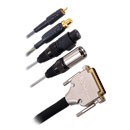
Open diplomatic relations between your vpr Matrix 200A5 notebook and your home stereo speakers for a booming digital audio experience. Parallel port, male/female RCA and XLR connectors.
Available at BestBuy.com and by order through Best Buy stores.
Recommended Retail Price $249.99

Product Features
- Plugs into back parallel port
- Gold male/female RCA connectors
- Male/Female Digital XLR connectors
- Individually shielded channels
- Rubber O-rings on both connectors to resist dust, water and corrosion
- Sealing lip on female connector for a secure fit
- RFI/EMI shielded D-sub connector
- For use with vpr Matrix 200A5 notebooks
Product Details
- Model: DIG-110-B
- 10′ Cord
- Compatible with vpr Matrix 200A5 Notebooks
- 2 SPDIF 75-ohm ultraflexible channels with 74-ohm impedance-matched RCA connectors (1 male, 1 female), each channel individually shielded; gold contacts for superb abrasion resistance; 75-ohm SPDIF.
- 2 XLR (AES/EBU) Connectors
- 1 year limited warranty
So anyhow, I read about this cable and read what people wrote about vpr Matrix’s digital audio support, and decided to go ahead and buy one for myself and see what it does. If nothing else, what I learn will help other people figure out if they want to buy one of these expensive cables. Also, I’d been reading on the forums and by email that some people believe that the S/PDIF support on these computers doesn’t work and never has. One guy said he suspected that vpr Matrix (aka Best Buy) rushed the product to market without actually getting digital audio to work. Since I’m a musician and have access to a variety of digital audio devices, I figured I’m especially well positioned to test this theory out and see for myself.
I ordered my cable online (you can’t get them through your local Best Buy store) and it just arrived yesterday (March 21, 2003)! I was so excited to open the box and take a look inside.
Here are my first impressions.
The cable itself comes wrapped in some kind of tissue paper type stuff which is inside a resealable anti-static bag. It definitely looks well made. The connectors are all of good quality, and the cable is well armored. As you can see from the photo above, it has a parallel connector on one end and 4 connectors on the other - female RCA, male RCA, female XLR, and male XLR.
A two page “user manual” is printed on a single sheet of paper that’s included in the box. And there’s another half sheet of paper with vpr Matrix’s warranty information, clearly showing this has a “One Year Limited Warranty.”
From reading over the one sheet of instructions and thinking about how this thing works, I soon made my first realization.
Lesson 1: The digital audio feature of the 200A5 is only for output.
There is no facility - even with the special cable - for sending a digital signal into the laptop.
I was somewhat disappointed about this. I hadn’t really thought it through, but I guess I thought that for this much money, you must be able to send in digital input signals, too. Why else would they include both male and female connectors of each type? I assumed one connector must be for input and one for output.
I didn’t have any more time to play with the cable, because I had to pack up to go to Byron’s to set things up for recording this weekend. Since he has an ADAT, maybe we can play around with the AES/EBU connection later today or tomorrow.
3/27/03
I’m not totally sure about Lesson 1 above. Even though the documentation only talks about using this cable for output from the notebook, I don’t really know that it won’t do input.
I hooked the S/PDIF RCA output from Sponge to the female RCA input on Ahi and did Function+F8 until “S/PDIF through External RCA” appeared. When I played a signal from Sponge, nothing appears on my SoundMAX Digital Audio WAV device on Ahi in SONAR.
Hooked up Sponge to my BOSS SP-505 digital input the same way, it works fine. That just proves that Sponge’s S/PDIF output isn’t the source of the problem here.
Hooked up Ahi’s male RCA to the BOSS. The BOSS doesn’t recognize any incoming S/PDIF signal.
Hooked up Ahi’s male RCA to the S/PDIF input on the Layla24. The S/PDIF light on the Layla24 Console blinks, as if it’s trying unsuccessfully to lock onto an input clock signal. A horrible noise comes through at maximum volume.
Hooked up Ahi’s male RCA to the S/PDIF output on the Layla24. SoundMAX Digital Audio driver doesn’t show any input.
Hooked up Sponge’s S/PDIF output to the Layla24 and got a noisy input signal, with most of the real audio signal heard. Byron says that’s probably a symptom of clocking problems.
3/29/03
I took the notebook and cable over to Byron’s yesterday. We tried it with his MOTU audio interface (crap, I forgot what model number it is). It has S/PDIF in and out. We just tried the in, using the notebook PC as the source. We couldn’t get the MOTU to sync up with the incoming S/PDIF clock or register any incoming signal whatsoever.
We did notice one bug about the vpr Matrix 200A5. When you hit Fn+F8 to cycle through the possible digital audio options, the on screen display says “SPDIF through XLR”. But that doesn’t make sense, because S/PDIF is an unbalanced interface and therefore uses RCA jacks. We assume they meant for this option to really say “AES/EBU through XLR”. AES/EBU is the balanced interface version of S/PDIF, which uses XLR cables.
Regardless of what the on screen display show, we have been unable to get any other S/PDIF device to successfully receive the S/PDIF output from the vpr Matrix.
In going through the audio control panel and stuff, I found a thing called “Sound Hardware Test Wizard” and thought it might be informative to run that. So I did. There was a progress bar that got to around 100% before I got an error dialog that said, “DirectPlay Voice Setup - An error occurred during DirectPlay voice setup. The error code is 0×80004005.” I clicked OK and then got another error that said, “Windows cannot execute DpvSetup.exe. Use Add/Remove Programs control panel to install.” It’s interesting that it says “DirectPlay” when I though that term was phased out several years ago in favor of DirectX. Also, how come there’s a test wizard that crashes? Is the software bad? Is the hardware bad? I have no idea, but it’s probably not important to the task at hand.
I decided to call vpr Matrix (aka Best Buy) tech support. I talked with a very friendly guy there and described everything we were trying to do. I told him I have two main questions at this point:
- Can the vpr Matrix use the digital audio stream as an input device? I’m still confused about this. There are both male and female plugs for both the XLR (AES/EBU) cable and the RCA (S/PDIF) cable. That would lead you to believe you can do input or output. But the 2 page user guide only talks about output.
- What clock rates should the vpr Matrix handle? Does it only work at 96kHz and 192kHz, or does it speak the more common pro audio rates of 44.1kHz and 48kHz, too?
The tech support guy didn’t know the answer to either question, and said his engineer is in normal hours on weekdays. So he took down all my info and my cell phone number and said the engineer should call me Monday or Tuesday. I can’t wait! Until then, my investigations are stalled.
4/1/03
Wow, yesterday was a landmark day in my research. I got calls back from vpr Matrix tech support - not just 1 call, but 2 different people there called me! The first person (I’ll call him VPR1) knew a fair amount, but couldn’t answer some of my questions, but the second guy (VPR2) seems to really know everything about the 200A5 audio features and answered the rest of my questions. VPR2 even said he’s read my web site and liked it.
First off, the big news. Both techs told me the parallel digital cable does not work for its advertised purpose. There’s nothing that can be done. No settings to tweak, etc. Digital audio just does not work with this cable. They both recommended I should return the cable for refund immediately, before my return period expires.
Lesson 2: The digital audio feature by way of the parallel digital audio
cable doesn’t work. Don’t buy it. If you already bought it, try to return it.
VPR2 confirmed my suspicion that the digital audio was only designed for output. The interface has no input capabilities. So Lesson 1 (see above) is correct after all.
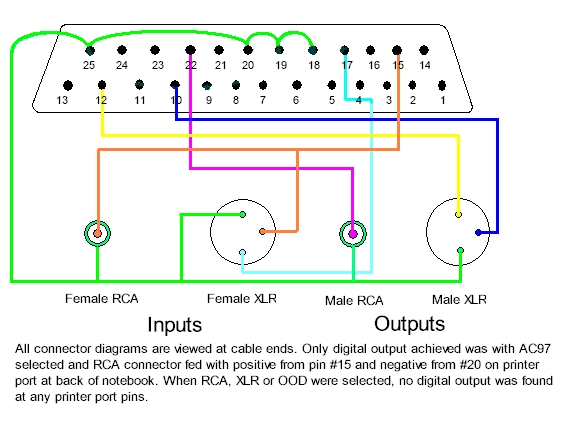
I then asked if the problem with the cable was something I could fix by just rewiring some pins. And can I get a pin out diagram? He said that there was one person he’s heard of who, through experimentation, found that he could get a S/PDIF signal on two pins of the parallel port (pins 15 and 20) if he used Fn+F8 to navigate to one particular setting - SPDIF AC97. He said I could probably do that, but that I would be just as well off returning the expensive parallel cable and building my own digital audio cable from an off-the-shelf printer cable.
I guess if only two pins are active, then there’s not a lot of sense in having all 4 connectors on this cable. Only one of them could work anyhow. It doesn’t make sense to me why “SPDIF AC97” would send digital audio out the parallel port, instead of “SPDIF External RCA” but that’s what VPR2 said.
Lesson 3: Only 2 pins of the 25 do anything, so you might as well build your
own S/PDIF RCA cable for $20.
If only 2 pins work, that eliminates the possibility of a balanced connection, which means…
Lesson 4: AES/EBU doesn’t work at all. At best, you can only get S/PDIF
out of this device.
The fact that VPR2 suggested just building my own digital audio cable based on a standard printer cable pretty much confirms my original thought that…
Lesson 5: There is no active circuitry in the parallel digital audio cable.
Next, we talked about clock rates, and I learned…
Lesson 6: 96kHz and 192kHz are the only sampling rates this card is intended
to handle on the digital output. This makes it pretty much worthless for pro audio, since everyone uses 44kHz and 48kHz. (ok, maybe not everyone but the vast majority of audio gear uses one of those sampling rates with S/PDIF)
I asked about the other cable that vpr Matrix advertises, the one that goes from stereo miniplug to a pair of RCA outputs. I’ve read on user forums that the other (non-widescreen) line of vpr Matrix notebooks advertise S/PDIF support, so I was curious how they did it and wondered if this cable had something to do with it. VPR2 confirmed that it’s just an analog cable. Wow, that’s amazing that they sell this thing for $150, when you can buy a cable that does the same thing from Radio Shack for $7 or from Monster Cable for $50. But analog audio isn’t what this page is all about.
Getting back to digital audio, VPR2 said there’s a list I can get on to be notified when they have a fix for the digital audio issues with the 200A5. Of course I wanted on the list, though he couldn’t tell me what or when the fix would be. If the thing was only designed to do output at 96kHz or 192kHz, then it doesn’t do me any good, anyhow. But I got on the list, just in case they do more than I expect they will.
Not knowing who else to contact to complain about the fact that Best Buy is selling a product that is known not to work, I just submitted this message to their web feedback form. I think it’s unethical for them to continue to offer this product.
I bought a “Digital Parallel Cable for 200A5 Notebooks” model number DIG-110-B. I talked to two people in vpr Matrix tech support yesterday who both told me the cable has a design flaw that makes it unusable, and I need to return it for a refund. If the product is known not to work, I think it’s wrong for you to continue to advertise it on your website and to fulfill orders. You should stop accepting orders until you fix the problem with the cable and the 200A5.
So I’ll be returning my cable ASAP.
4/14/03
I went by BestBuy.com today and noticed that they’re no longer selling the $250 audio cable. I can’t even find it on their site anymore!
4/15/03
Ooh, this is exciting. I met up online with the guy referred to above as “the person he’s heard of who, through experimentation, found that he could get a S/PDIF signal on two pins of the parallel port.” He goes by the nickname Goldeneared, and gave me this diagram. His note to me was:
Here’s the schematic for the cable I made for VPR tech. Color coding was random and follows no specific technical guidelines. The text gives details for creating your own DIY cable with a single RCA digital output. As it states, all views are looking at the ends of the cables. Hope this helps.